Arduin: A Handwriting Script Typeface for Creative Workflow
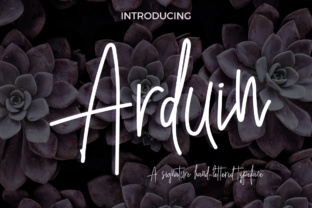
Arduin is a handwriting script typeface that captures the essence of a bold, confident personality. Designed to evoke a sense of energy and sophistication, it blends the charm of a messy yet readable hand with the elegance of a well-crafted font. The name Arduin means "brave friend," reflecting its self-assured nature and ability to stand out in a variety of design contexts. Whether you're working on a personal project or a professional endeavor, Arduin can add a unique touch that enhances your visual communication.
Understanding Arduin in the Design Process
When integrating Arduin into your workflow, it's important to consider how it fits within the broader design process. From initial concept to final execution, fonts play a critical role in shaping the tone and message of a project. Arduin is particularly effective in situations where a human touch is desired—whether in branding, editorial design, or digital content creation. Its distinctive style makes it ideal for headlines, logos, and other elements that require a strong visual presence.
Before starting a project, designers often choose a typeface that aligns with the overall aesthetic and purpose of the work. Arduin can be a great choice when the goal is to convey approachability, creativity, or individuality. It works well alongside more structured fonts, offering a contrast that draws attention without overwhelming the composition.
Using Arduin in Different Stages of a Project
Arduin can be used at various stages of a project, depending on the goals and requirements. During the planning phase, it can serve as a source of inspiration, helping to establish the visual direction of a design. When creating mockups or prototypes, Arduin adds a personal and dynamic feel that can help communicate the intended mood or message.
During the implementation stage, Arduin can be applied to key elements such as headings, callout text, or social media graphics. Its readability ensures that even in smaller sizes, the font remains legible while maintaining its expressive character. After the project is complete, Arduin can continue to be used in promotional materials, packaging, or any output that requires a consistent and recognizable identity.
Integrating Arduin with Other Tools and Resources
Arduin’s versatility allows it to work well with a range of design tools and platforms. Whether you're using Adobe Creative Suite, Figma, Canva, or other design software, Arduin can be easily incorporated into your workflow. Many of these platforms offer font libraries that make it simple to access and apply Arduin to different projects.
When working with other design elements, such as color schemes, images, or layouts, it's important to ensure that Arduin complements the overall composition. For example, pairing Arduin with a minimalist background can highlight its expressive qualities, while using it in conjunction with bold colors can create a striking visual impact. Testing different combinations can help determine the best way to use Arduin in specific contexts.
Practical Tips for Implementing Arduin
To get the most out of Arduin, consider the following practical tips:
- Use it strategically: Apply Arduin to key areas where a personal or creative touch is needed, rather than overusing it throughout an entire document or design.
- Test readability: Ensure that Arduin remains legible in different sizes and formats, especially when used in body text or small details.
- Combine with complementary fonts: Pair Arduin with sans-serif or serif fonts to create a balanced and visually appealing layout.
- Experiment with spacing: Adjust letter spacing and line height to enhance the clarity and impact of the font.
- Consider the audience: Tailor the use of Arduin based on the target audience and the context of the project. For example, a more formal setting may benefit from a subtler application of the font.
Arduin in Real-World Workflows
Arduin can be integrated into a wide range of workflows, from personal projects to professional environments. For instance, a marketer might use Arduin in social media posts or email campaigns to create a more engaging and authentic tone. A designer could apply it to a logo or brand identity to reflect a unique and confident personality.
In educational settings, Arduin can be used in presentations, handouts, or digital learning materials to add a creative and approachable element. For entrepreneurs and small business owners, incorporating Arduin into marketing collateral or website design can help differentiate their brand and connect with their audience on a more personal level.
Long-Term Use and Maintenance
When using Arduin for long-term projects or recurring tasks, it's important to maintain consistency and quality. This includes ensuring that the font is properly licensed for commercial use, if applicable, and that it remains compatible with the tools and platforms being used. Regularly reviewing and updating designs that feature Arduin can also help keep the visual identity fresh and relevant.
Additionally, keeping track of how Arduin performs across different mediums—such as print, web, or mobile—can help identify any potential issues and optimize its use. By staying mindful of these factors, users can continue to benefit from Arduin’s unique style and functionality over time.
Conclusion: Embracing Arduin for Creative Expression
Arduin offers a distinctive and expressive alternative to traditional typefaces, making it a valuable addition to any designer’s toolkit. Its combination of energy, readability, and personality makes it suitable for a wide range of applications, from branding and marketing to personal projects and educational materials. By understanding how to integrate Arduin into different workflows and design processes, users can leverage its strengths to enhance their visual communication and achieve more dynamic and engaging results.